Revenue forecasting software
Revenue forecasting software you can actually see.
Most forecasting tools ask you to trust a number you can’t explain. Pipemetry is the transparent, self-serve alternative for SMB and lower-mid-market RevOps teams: it reconstructs your pipeline history, forecasts with models you can inspect, and tracks how accurate each call turns out to be — so you can defend the number, not just report it.
Why transparency matters in a forecast
A forecast drives hiring, spend, and board conversations — so “the model says so” isn’t good enough. When you can see the inputs, the model, and the assumptions behind every projection, you can challenge it, correct it, and trust it. That’s the whole idea behind forecasting revenue without a black box: a number your team can explain is a number your team will actually use.
What matters in revenue forecasting software
-
Point-in-time pipeline history
A forecast is only as good as the history behind it. Pipemetry reconstructs your pipeline from an event log, so you can rewind to any past day and see exactly what it looked like — not a snapshot your CRM has since overwritten.
-
Forecast models you can inspect
No black box. Every projection shows its inputs, the model, and the assumptions. Switch between four transparent models with the model selector on Pro — a cohort heuristic, a stage-weighted pipeline, an ML deal score, and an ensemble that blends them — each with a Monte-Carlo p10–p90 confidence band on Pro — a real range, not a hardcoded ±%.
-
Human forecast calls, rolled up
Reps and managers submit their own commit and best-case numbers each period, rolled up the management hierarchy with role-based scoping. Compare the human call against the model, side by side, and track who calls it accurately over time.
-
Accuracy you can prove
Per-owner scorecards track MAPE, bias, and forecast-submission compliance over time. Read the waterfall of what changed since last week, run scenarios, and hold the process accountable with numbers instead of vibes — here is how to measure sales forecast accuracy, or backtest it on your own closed quarters before you trust a forward number.
-
Risk alerts where you work
Get notified by email — or Slack on Pro — when a deal slips, coverage drops below plan, or a Salesforce deal goes quiet, so risk surfaces before the QBR, not after it.
-
Self-serve setup on your CRM
Connect Salesforce (with live change-data-capture sync) or HubSpot yourself, map your fields once, and get a working forecast and waterfall the same day — no months-long implementation, no mandatory services engagement.
Sales forecasting software, revenue forecasting software — same job
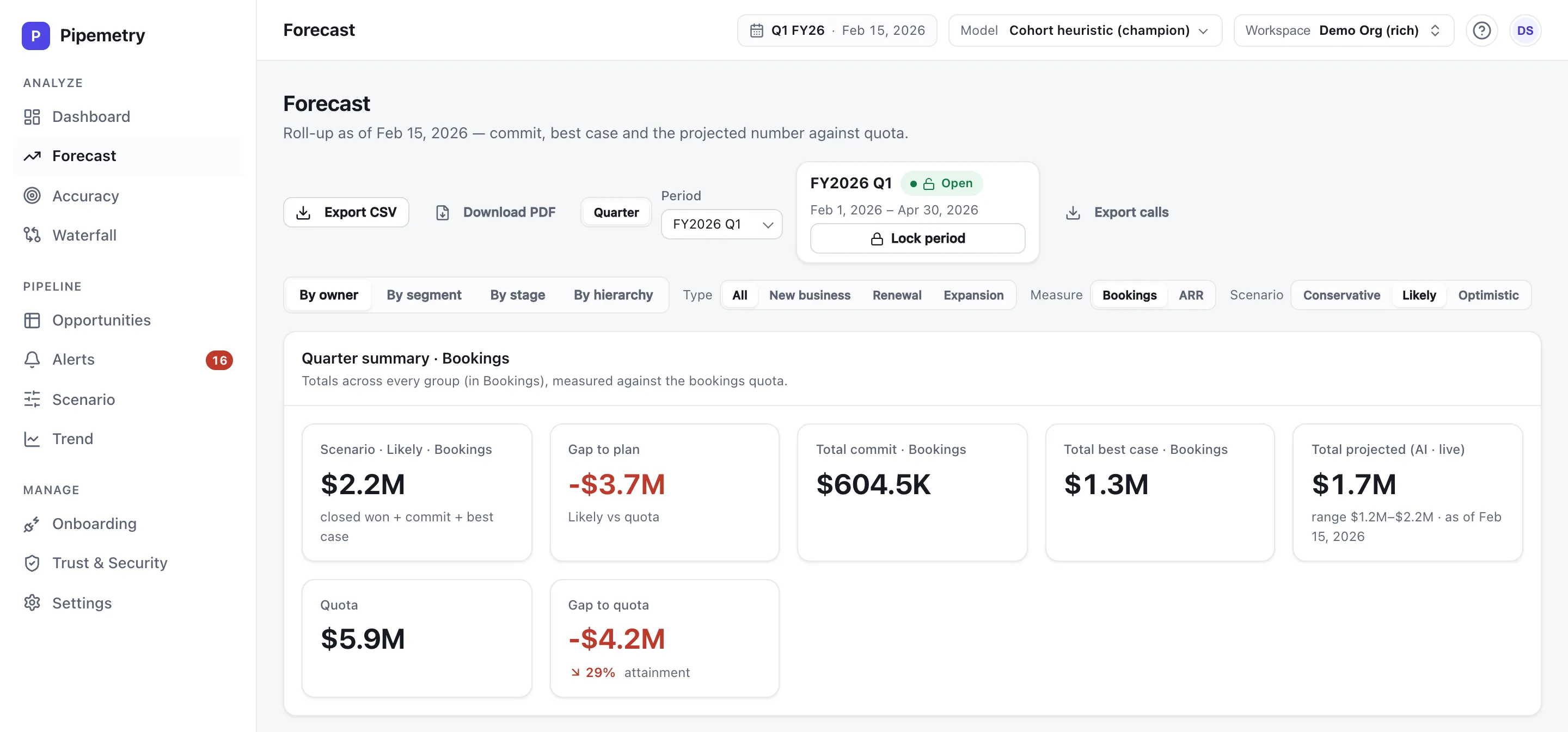
Sellers say “sales forecasting software”; RevOps and finance say “revenue forecasting software.” Whichever you searched for, the job is the same: project what the team will close, show the assumptions behind the number, track how accurate the calls turn out to be, and surface risk while there is still time to act. Pipemetry covers both framings — it forecasts new business, renewal, and expansion, in bookings or ARR, and every projection stays inspectable either way. That split is read from your CRM’s own deal-type field rather than inferred from stage names, so a forecast type your data cannot actually answer is reported as unanswerable rather than as a confident zero.
No CRM? Forecast from the spreadsheet you already have — no Salesforce, no HubSpot, no seat minimum.
Who it’s for
Pipemetry is built for SMB and lower-mid-market RevOps and sales teams — roughly 10–100 reps — that want to run the number without an enterprise price tag or a months-long rollout. If the pipeline-history side — the waterfall, coverage, and slippage views — is what you need most, start with the sales pipeline analytics tour. No CRM yet? Forecast from a spreadsheet instead. If you need conversation intelligence and a large services engagement, a full enterprise suite may fit better; see the honest Pipemetry vs Clari comparison for where each makes sense.
Revenue forecasting FAQ
What is revenue forecasting software?
Revenue forecasting software turns your CRM pipeline into a forward-looking projection of how much you will close, and helps you manage the forecast: track accuracy, spot risk, and run scenarios. Pipemetry does this transparently — every number shows the model and inputs behind it — for SMB and lower-mid-market RevOps teams.
How is this different from a spreadsheet or a CRM report?
A CRM report only reflects the current state and forgets its own history; a spreadsheet is manual and stale the moment you save it. Pipemetry keeps a point-in-time event log so it can reconstruct any past day, applies inspectable forecast models with confidence bands, and tracks how accurate each forecast turned out to be.
Which CRMs does it connect to?
Pipemetry connects to Salesforce (with live change-data-capture sync that keeps your pipeline current) and to HubSpot. Setup is self-serve: connect, map your fields, and get a forecast the same day.
Do I have to trust a black-box AI model?
No. Pipemetry uses statistical forecasting with optional machine-learning estimators, but every projection is fully inspectable — you can see the inputs, the model, and the assumptions, and switch models on Pro when you want. Transparency is the point: models, not magic.
Is Pipemetry sales forecasting software?
Yes. Sales forecasting software and revenue forecasting software describe the same job — projecting what your team will close and managing the process around the number. Pipemetry does both meanings of it: transparent forecasts for new business, renewal, and expansion, in bookings or ARR, with accuracy tracked per owner. The new/renewal/expansion split is read from your CRM's own deal-type field rather than inferred, so if your CRM cannot distinguish a renewal from an expansion, Pipemetry says so instead of reporting an empty quarter.
How much does revenue forecasting software cost?
Pipemetry is priced per seat, for SMB: Starter at $29 per seat / month (up to ~10 seats), Pro at $59 per seat / month (up to ~25 seats), and Enterprise with custom, sales-led pricing for larger teams that need SSO and a security review.
Is it a good fit for a small team?
Yes — it is purpose-built for teams of roughly 10–100 reps that find enterprise RevOps suites expensive, opaque, or heavy to implement. It is not a full enterprise suite (no conversation intelligence), and it does not try to be.
See a forecast you can defend.
Connect Salesforce, HubSpot, Pipedrive or Zoho and get a transparent forecast the same day — free to start.