Product
Transparent, explainable forecasting and pipeline analytics — no black box.
Pipemetry brings pipeline history, transparent forecasting, accuracy tracking, and risk alerts into one fast tool — built for SMB and lower-mid-market RevOps teams who want to understand the number, not just stare at it. See how we forecast revenue without a black box.
The moat
Point-in-time pipeline history
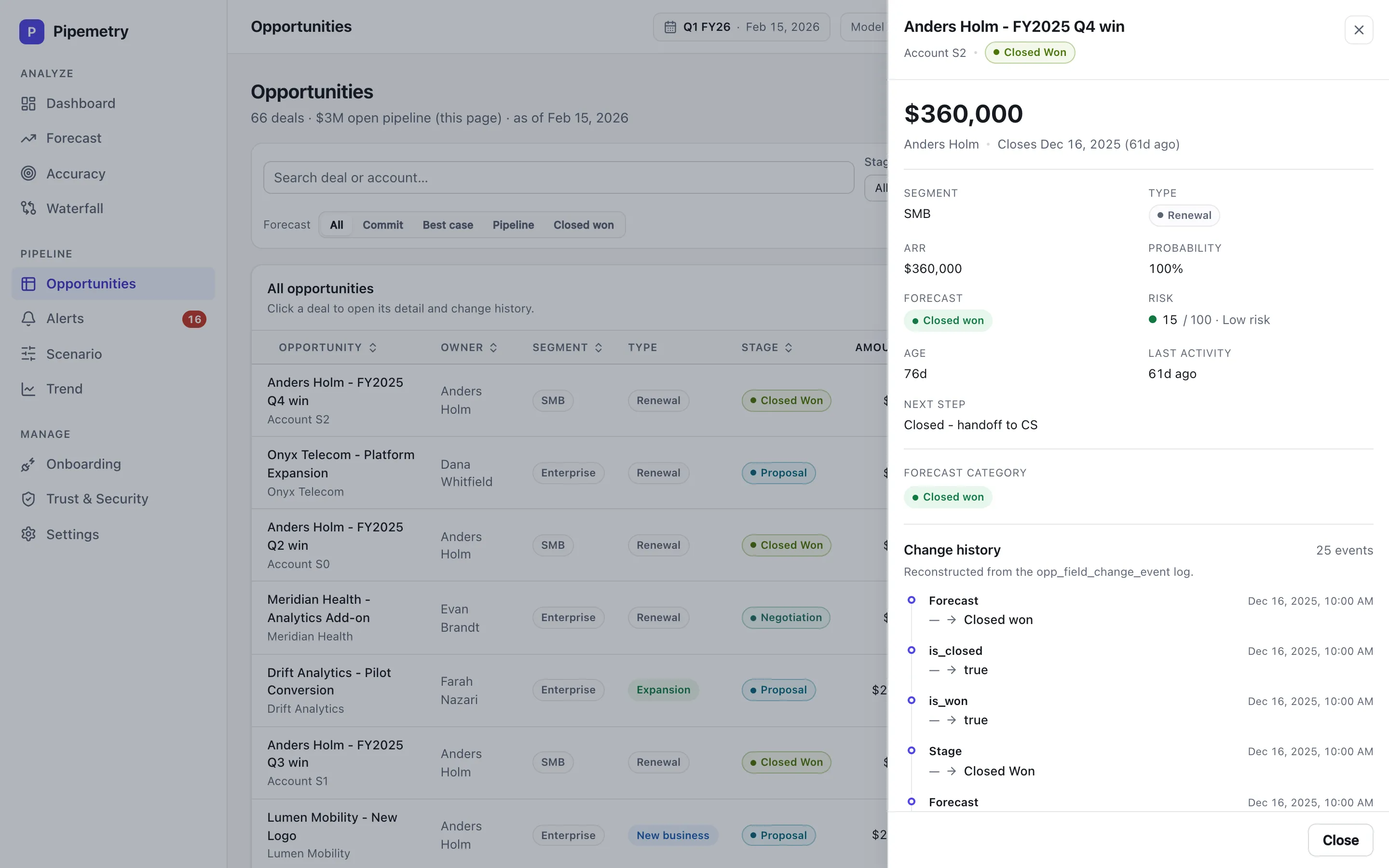
Most tools show you the pipeline as it is right now — and quietly overwrite the past. Pipemetry records an event log of every change, so it can reconstruct exactly what your pipeline looked like on any day. Rewind to last Monday, quarter-end, or the day before a deal slipped. Days before your recorded history begins are rebuilt from today’s field values, not from what was recorded at the time — an approximation, not a snapshot.
- See your pipeline as of any past date
- Reconstructed from an event log, not a nightly snapshot
- Answer "what changed, and when?" with confidence
- Audit how a forecast evolved over a quarter
No black box
Explainable revenue forecasts with confidence bands (p10/p50/p90)
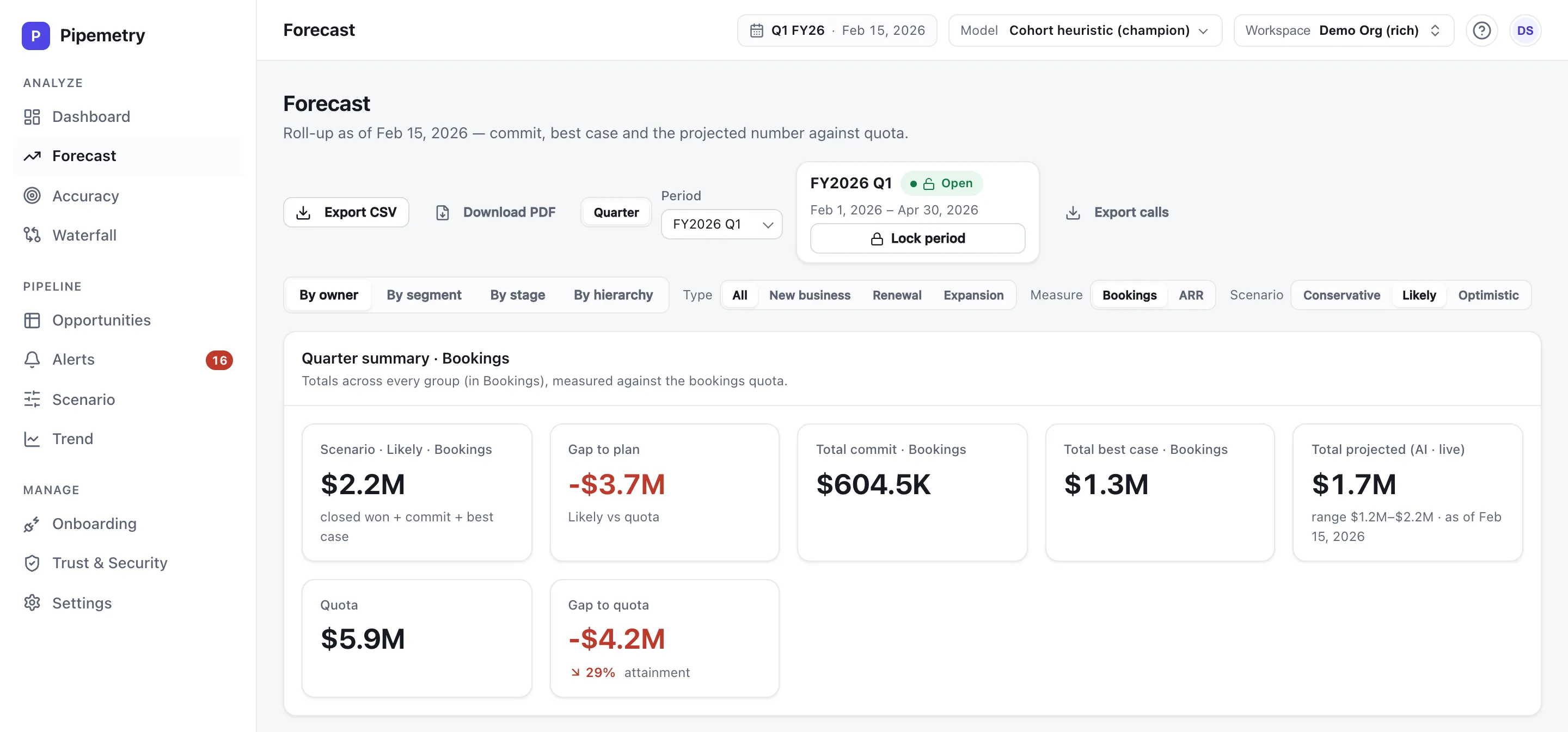
AI sales forecasting for SMB does not have to be a mystery. Pick your model with the built-in selector on Pro — a cohort heuristic, a stage-weighted pipeline, an ML deal score, or an ensemble that blends them — and every Pipemetry forecast shows its inputs, the model behind it, and its assumptions. Each projection carries a Monte-Carlo confidence band, so you commit a number with a stated downside and upside, not false precision.
- Inspect the inputs and assumptions behind every projection
- Model selector on Pro: cohort, stage-weighted, ML, or an ensemble — all inspectable
- A Monte-Carlo p10/p50/p90 range around every projection on Pro — a real range, not a hardcoded ±%
- Forecast new business, renewal, and expansion separately — in bookings or ARR. The split is read from your CRM's own type field, never guessed, so Pipemetry tells you when your data cannot tell them apart instead of reporting a confident zero
- A plain-English narrative of the number, generated only from your reconstructed data
- Reproducible: the same inputs give the same forecast
Down to the deal
Per-deal win probability, with the drivers behind it
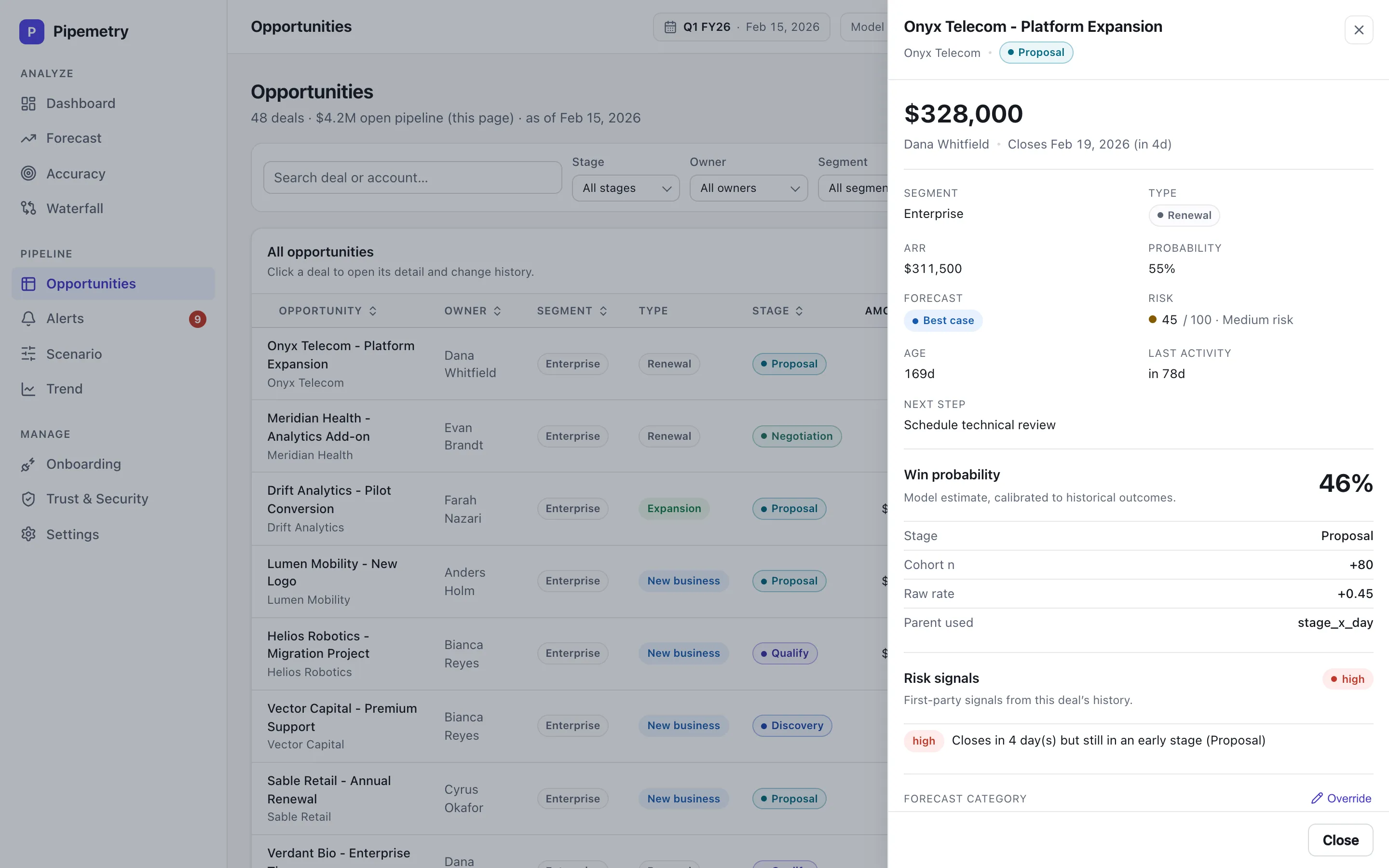
Aggregate forecasts are only half the story. Open any opportunity and Pipemetry shows the selected model’s win probability for that specific deal — and the drivers that moved it, each with its own contribution. It reads from the same model you picked for the forecast, so the deal-level view and the roll-up agree. When someone asks why a deal sits where it does, you point at the factors, not a black box.
- A win probability for every open deal, right on the opportunity
- The drivers behind it — like stage and cohort — each with its own contribution
- Reads from your selected model: cohort, stage-weighted, ML, or ensemble
- Calibrated to your historical win rates — and flagged when an estimate is low-confidence or not yet calibrated
- Model-agnostic display: new drivers surface automatically, nothing hard-coded to one factor
Prove it
Accuracy & waterfall analytics
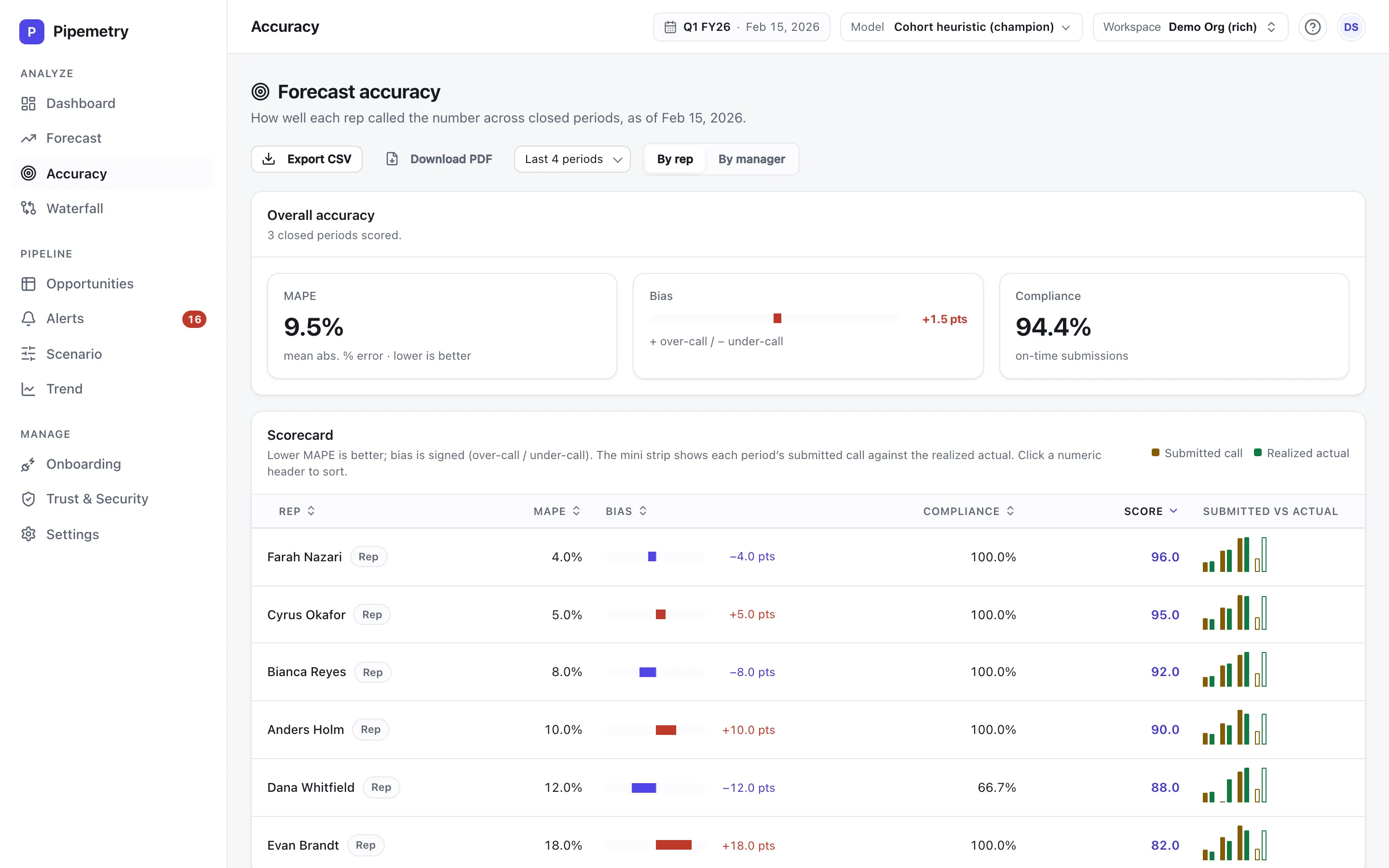
Hold your forecasting process accountable. Pipemetry tracks accuracy over time with MAPE and bias, and the waterfall shows exactly what moved the number since last week — new deals, slips, pushes, and wins — so review meetings start from facts. For the method, read how to measure sales forecast accuracy. And before you trust it going forward, backtest Pipemetry on your own closed quarters: it replays what it would have forecast at day 1, at 50%, and at 80% through each quarter and scores that against what actually closed — honest-empty when your history is still thin.
- Accuracy scorecards per owner: MAPE, bias, and forecast-submission compliance
- Backtest on your own closed quarters — day-1, mid-quarter, and late vantages
- See why the number moved: the change between two dates split into probability shifts, amount changes, and new or dropped pipeline
- Period-over-period waterfall of what changed
- Coverage and pipeline-health analytics
- Catch systematic over- or under-forecasting
- Export any grid to CSV; board-ready PDF reports on Pro
Act early
Real risk alerts
Risk should surface before the QBR. Pipemetry sends alerts to email — or Slack on Pro — when a deal slips its close date, coverage drops below plan, or — on Salesforce, the one connector that gives us activity data — a deal goes quiet, so the team acts on risk while there is still time to do something about it.
- Email alerts on every plan; Slack push on Pro
- Slipped deals, coverage gaps, chronic miscallers — plus single-threaded deals on Salesforce, HubSpot, Pipedrive and Zoho. Stalled deals are Salesforce-only.
- Per-deal risk signals right on the opportunity
- Sensible built-in thresholds — no tuning project required
- Surface risk before it becomes a miss
Run the call
Commit & best-case forecast calls, rolled up the hierarchy
Reps and managers submit their own commit and best-case numbers each period, rolled up through the management hierarchy with role-based scoping so each manager sees their own tree. Compare the human call against the model projection side by side — or let the consensus forecast blend them, weighted by who has actually been right.
- Commit and best-case submissions per owner
- Roll up calls through the manager hierarchy (Pro) — by owner, segment, or stage
- Human call vs model projection, side by side
- Consensus forecast: an accuracy-weighted blend of the team and the model
- Lockable forecast periods
Plan ahead
Scenario planning & what-if
Model the quarter under different assumptions — best case, commit, worst case — with per-deal category overrides, and see how the forecast and coverage shift. Bring scenarios, not vibes, to the board update.
- Best-case / commit / worst-case views
- Per-deal category overrides and what-if scenarios
- Test the impact of slips and upside
- Defensible numbers for the board
Self-serve
Salesforce, HubSpot, Pipedrive and Zoho, set up in minutes
No months-long implementation. Connect Salesforce, HubSpot, Pipedrive or Zoho yourself — Salesforce over live change-data-capture sync — map your fields once, and get a working forecast, waterfall, and accuracy view the same day. RevOps stays in control — no mandatory services engagement. On a CRM we don’t connect to yet? Upload a CSV or Excel export instead — same point-in-time event log, same forecast. See all CRM integrations, build on the API, or work through the full setup steps in the docs.
- Salesforce, HubSpot, Pipedrive and Zoho connectors, Salesforce over live CDC sync
- CSV import when you don’t have a supported CRM — deterministic, idempotent re-upload
- Self-serve field mapping, with an AI setup assistant when you want it
- Working forecast on day one
- Fast, information-dense UI built for power users
Live in it all day
Dark mode, saved views, and a command bar
Pipemetry is built for people who sit in dense grids all day, so the everyday details get the same attention as the forecast math. Switch between Light, Dark, and System from the topbar — System follows your OS — and the choice persists across pages and reloads, with charts repainting cleanly on the switch. On the Forecast and Opportunities pages, save a filter-and-sort combination by name and reopen it in one click from the Saved views menu; views are stored in this browser, so set up the ones you use in each browser you work from — they aren’t shared with teammates and don’t sync across devices. And press Cmd+K (Ctrl+K on Windows/Linux) to open a command bar: jump to any page, jump straight to a deal, or flip the theme, without leaving the keyboard. None of this is gated — theme, saved views, and the command bar are on every plan, including Starter.
- Light / Dark / System theme toggle, on every plan
- Theme choice persists across navigation and reload; charts repaint on switch
- Saved views on Forecast and Opportunities — name a filter/sort, reopen it in one click
- Views live in this browser only — not synced across devices, not shared with teammates
- Cmd+K / Ctrl+K command bar: navigate, jump to a deal, or toggle theme
Try before you connect
Explore the whole product on sample data — before you touch your CRM
You shouldn’t have to connect a production CRM just to evaluate a tool. Seed your own workspace with realistic synthetic data and walk through every screen — forecast roll-up, waterfall, per-deal win probability, accuracy, alerts — in minutes. It’s clearly labelled as sample data, never mixed with anything real, and wiped automatically the first time you connect a live CRM.
- Synthetic sample data in your own workspace — no shared demo login
- Click through forecast, waterfall, accuracy and alerts end to end
- Clearly-labelled fiction — never mixed with real data
- Auto-wiped before your first real CRM connect or import
No lock-in
Your forecast, in the tools you already use
Pipemetry is transparent about your data on the way out, too. A workspace admin can mint a scoped, revocable API key — shown once, stored only as a hash — to read your forecast, opportunities and accuracy over a rate-limited read API, pull a live number straight into Google Sheets or Excel with a signed link, or register an HMAC-signed webhook endpoint and verify it with a signed test delivery.
- Read API for forecast, opportunities and accuracy — per-workspace key, rate-limited
- Live figures in Google Sheets or Excel via a signed, scoped link
- HMAC-signed outbound webhooks (SSRF-guarded) to your endpoints
- Own your data — no walled garden
Product FAQ
Is Pipemetry AI sales forecasting?
Pipemetry uses statistical forecasting models with optional machine-learning estimators, but unlike most "AI forecasting" tools it is fully transparent: you can inspect the inputs, the model, and the assumptions behind every number, and swap models on Pro if you want.
Can I use Pipemetry as sales pipeline analytics without forecasting?
Yes. Even without leaning on the forecast, the point-in-time pipeline history, waterfall, coverage analytics and risk alerts make Pipemetry a strong sales pipeline analytics tool on their own.
Does Pipemetry score individual deals, or just the total forecast?
Both. Alongside the aggregate forecast, every open opportunity carries the selected model’s win probability and the drivers behind it — the factors that moved the number, each with its own contribution. It uses the same model as your forecast, and flags any estimate that is low-confidence or not yet calibrated.
Can I try Pipemetry without connecting my CRM?
Yes. Seed your own workspace with clearly-labelled sample data and explore the whole product first, or import a CSV export to forecast from a spreadsheet. The sample data is never mixed with anything real and is wiped automatically before your first live CRM connection.
Can I backtest the forecast on my own history?
Yes. The backtest replays Pipemetry’s model against quarters you’ve already closed — at day one, mid-quarter, and 80% through — and scores each call against what actually closed, using the same MAPE metric as the ongoing accuracy scorecards. If your history is thin it says so rather than inventing a number.
Does Pipemetry have an API?
Yes. A workspace admin can mint a per-workspace API key to read your forecast, opportunities, and accuracy over a rate-limited, read-only API, register HMAC-signed webhooks, or pull live grids into Google Sheets and Excel with a signed export link. The key is shown once and stored only as a hash.
How long does setup take?
Connect your CRM, map your fields, and you can see a working forecast the same day. Setup is self-serve — no required implementation services.
See it on your own pipeline.
Connect Salesforce or HubSpot and get a transparent forecast the same day. Start free — and see how we keep your data secure.