Salesforce integration
Revenue forecasting and pipeline analytics for Salesforce.
Connect Salesforce and Pipemetry reconstructs your pipeline point-in-time, keeps it current with live change-data-capture, and turns it into a forecast you can actually explain — set up yourself, working the same day. Read-only, encrypted, and built for SMB and lower-mid-market RevOps.
The connection
A read-only connection you control
Pipemetry connects to Salesforce through an OAuth 2.0 client-credentials flow on an external client app (or an existing connected app), running as an integration user scoped by a permission set. No password sharing, no browser extension. Pipemetry only reads the opportunity data it forecasts on — the connector issues no create, update or delete call to Salesforce at all — and your credentials are encrypted at rest. Worth being precise about which side enforces that: Salesforce has no read-only API scope, so what bounds the connection is the permission set you build. The guided setup asks you to grant Read (and View All) on the objects below and nothing more, and to run the app as a dedicated integration user. You own that permission set and can tighten or revoke it at any time; Pipemetry does not check whether it also carries write permissions.
- OAuth 2.0 client-credentials via an external client or connected app — no password sharing
- An integration user you scope by a permission set — Read only, on the objects listed below
- Reads Opportunities + Opportunity Field History (Amount, Stage, Close Date, Forecast Category)
- Credentials encrypted at rest; Pipemetry issues no write call to Salesforce — no create, update or delete
The moat
Rewind your Salesforce pipeline to any past day
Salesforce reports show the pipeline as it is right now — the past is overwritten as fields change. Pipemetry reads Opportunities plus Opportunity Field History (Amount, Stage, Close Date, Forecast Category) and builds a point-in-time event log, so it can reconstruct exactly what your Salesforce pipeline looked like on any historical date. See what moved since last Monday, what quarter-end coverage really was, or how a deal evolved before it slipped.
- See your Salesforce pipeline as of any past date
- Built from Opportunity Field History, not a nightly snapshot
- Answer “what changed, and when?” with confidence
- Audit how the forecast evolved across a quarter
Always current
Live sync with Salesforce change-data-capture
Once connected, Pipemetry subscribes to Salesforce Change Data Capture over Salesforce's Pub/Sub API — two channels, and you choose both in your own Salesforce setup. OpportunityChangeEvent carries deal edits, so your forecast stays current without nightly batch lag. OpportunityContactRoleChangeEvent keeps the single-threaded-deal flag honest: a contact role is a child record, so adding or removing one never touches the opportunity and never shows up on the first channel — without the second, the engaged-contact count would only refresh on the periodic sync. Pipemetry treats that event as a prompt to re-read the COUNT of contacts on the deal; it reads no contact name, email or title, and never infers the new count from the event. A periodic reconciliation backfill catches anything a brief stream interruption might miss.
- Live OpportunityChangeEvent (CDC) streaming, not nightly batches
- OpportunityContactRoleChangeEvent keeps the engaged-contact count current — a count only, never contact details
- Your forecast reflects edits as they happen in Salesforce
- Periodic reconciliation backfill as a safety net
- Enable CDC once for Opportunity and OpportunityContactRole — Pipemetry handles the rest
Self-serve
Self-serve field mapping, working the same day
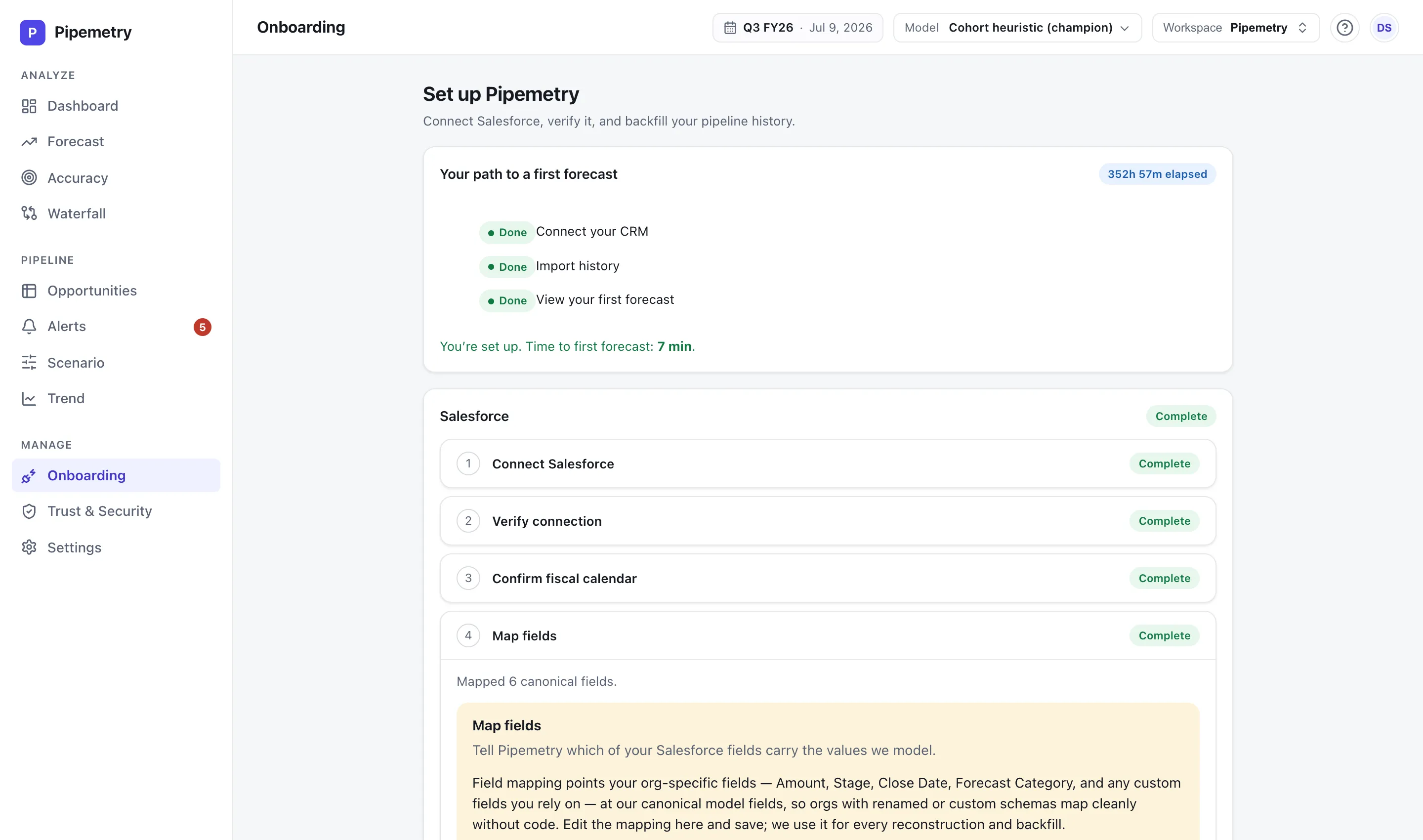
Map your stages, amount, close date, and forecast category once — in a guided setup, not a services engagement. Connect Salesforce, map your fields, and you can see a working forecast, waterfall, and accuracy view the same day, with RevOps in control the whole way.
- Guided self-serve field mapping
- Tell Pipemetry what your stages and fields mean — once
- Working forecast, waterfall, and accuracy on day one
- No mandatory implementation services
The payoff
What you get on top of your Salesforce data
On top of the pipeline Pipemetry reconstructs from Salesforce, you get a transparent forecast you can inspect — heuristic or ML, with p10–p90 confidence bands — a period-over-period waterfall, accuracy scorecards, commit and best-case forecast calls rolled up your hierarchy, and risk alerts. See the full feature set on the product page.
- Transparent forecast models you can inspect — with confidence bands
- Waterfall of what changed, plus accuracy scorecards (MAPE / bias)
- Commit / best-case calls rolled up the manager hierarchy
- Email risk alerts on every plan — Slack on Pro — for slips, stalls, and coverage gaps
Read-only, encrypted, and isolated
Pipemetry only reads from Salesforce — the connector issues no create, update or delete call — encrypts all traffic in transit and your credentials at rest, and isolates every customer’s data at the database layer with row-level security (RLS). See how we protect your CRM data — our SOC 2 program is in progress.
Salesforce integration FAQ
What Salesforce permissions does Pipemetry need?
Read access, granted to an integration user via a permission set. Opportunities and Opportunity Field History (Amount, Stage, Close Date, Forecast Category) are the pipeline and its change history. Pipemetry also reads your stage vocabulary (OpportunityStage), your fiscal calendar (FiscalYearSettings, Period), your org’s default currency (Organization), the owner and role hierarchy for manager roll-ups (User, UserRole), and a COUNT of engaged contacts per deal (OpportunityContactRole) — a number only, never contact names, emails or titles. Pipemetry issues no create, update or delete call to Salesforce — the only non-read request it makes is the OAuth token exchange.
How does Pipemetry connect to Salesforce?
Through an OAuth 2.0 client-credentials flow on an external client app (or an existing connected app) running as a dedicated integration user that you scope with a permission set. There is no password sharing and no browser extension, and credentials are encrypted at rest.
Is the Salesforce sync real-time?
Near-real-time — the term Salesforce itself uses for Change Data Capture. Pipemetry subscribes to two streams you enable yourself: OpportunityChangeEvent, so opportunity edits flow in continuously as they happen, and OpportunityContactRoleChangeEvent, so the engaged-contact count behind the single-threaded-deal flag moves when someone is added to or removed from a deal. A periodic backfill reconciles anything a stream interruption might miss, and it is also the fallback if you enable only the first channel.
What does Pipemetry read from OpportunityContactRole?
A count, and nothing else. The SOQL is a COUNT aggregate grouped by opportunity, so Pipemetry never reads a contact name, email or title. When a contact role changes, the change event only tells Pipemetry that the roles on a deal moved — not what the new total is — so it re-reads that one count rather than adding or subtracting one. If the re-read cannot be made, the count is left as it was and refreshed by the next sync; a number that was not measured is never written.
Does it work with Salesforce forecast categories?
Yes. Pipemetry reads your Forecast Category alongside Stage, Amount, and Close Date, and you map how your stages roll up during the guided setup.
Does Pipemetry change anything in Salesforce?
No. Pipemetry builds its own point-in-time history from your opportunity data and issues no create, update or delete call to Salesforce — the connector contains no such request. The permission set you grant is the second half of that: Salesforce has no read-only API scope, so scoping the integration user to Read is what makes the connection incapable of writing, and that part is yours to set.
How long does setup take?
Connect Salesforce, map your fields, and you can see a working forecast the same day. Setup is self-serve, with no required implementation services.