Revenue forecasting software for SMB & lower-mid-market
Revenue forecasting you can actually see — models, not magic.
Pipemetry is the transparent, self-serve Clari alternative for RevOps and sales teams with 10–100 reps. Every forecast shows its model and its inputs — with a p10–p90 confidence band on Pro — reconstruct your pipeline as of any past day and catch risk before the QBR, without the black box or the enterprise price tag.
14-day full-Pro trial, no card · Try it on sample data before you connect a CRM · Real-time Salesforce sync (CDC) + HubSpot
Built for SMB & lower-mid-market RevOps and sales teams
- Try on sample data — no CRM needed
- Import from a spreadsheet
- Real-time Salesforce sync + HubSpot
- Monte-Carlo confidence bands (p10/p50/p90, Pro)
- Commit & best-case forecast calls
- Accuracy scorecards (MAPE / bias)
- WORM access audit
We’re onboarding our first design partners — customer stories land here next.
Why teams choose Pipemetry
Everything you need to run an honest forecast — pipeline history, transparent models, accuracy tracking, and alerts — in one fast tool.
-
See your pipeline as of any past day
Pipemetry reconstructs pipeline state from an event log, so you can rewind to any historical date and see exactly what your pipeline looked like — not a best-guess snapshot. This is the moat: real point-in-time history, not a CRM that overwrites itself.
-
Forecast models you can inspect
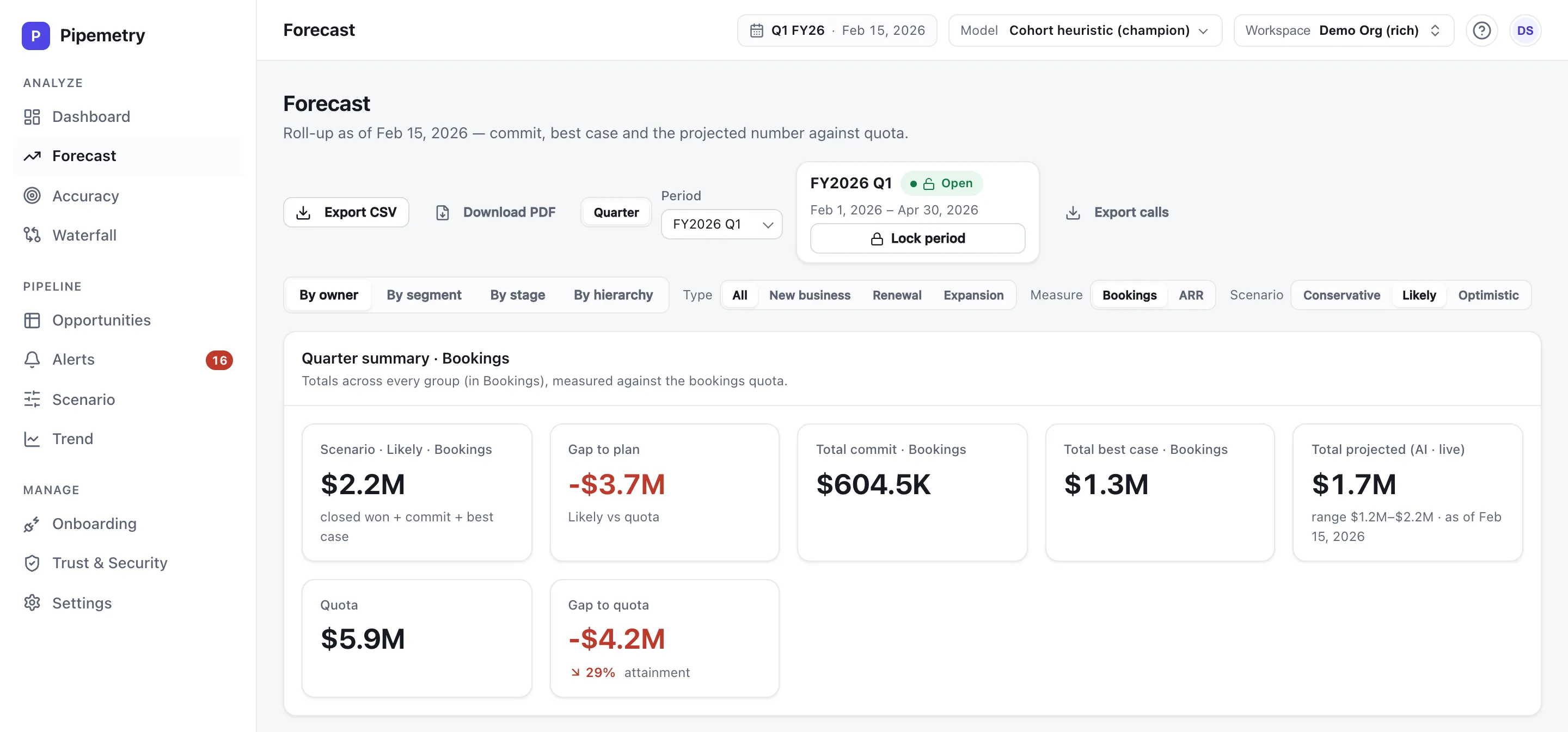
No black box. Every projection shows its inputs, the model behind it, and the assumptions. Swap between four transparent models with the model selector on Pro — a cohort heuristic, a stage-weighted pipeline, an ML deal score, and an ensemble that blends them — and Pro adds a Monte-Carlo p10/p50/p90 confidence band around every number — a real range, not a hardcoded ±%.
-
Every deal shows its win probability — and why
Open any opportunity and see the selected model’s win probability for that deal, plus the drivers that moved it — each with its own contribution. When someone asks why a deal sits where it does, you answer from the factors, not a black box. Low-confidence and not-yet-calibrated estimates are flagged, never hidden.
-
Roll up by rep, manager, or segment
Forecast roll-up follows your management hierarchy, with role-based scoping so each manager sees their own tree. Drill from the company number down to a single rep’s deals — by owner, segment, or stage.
-
Run the forecast call
Reps and managers submit their own commit and best-case numbers each period, rolled up the hierarchy. Compare the human call against the model projection, side by side, and track who calls it accurately over time.
-
Connect Salesforce, HubSpot, Pipedrive or Zoho in minutes
Self-serve setup. Connect your CRM, map your fields, and get a working forecast and waterfall the same day — no months-long implementation, no mandatory services engagement.
-
Real risk alerts, where you work
Get notified by email — or Slack on Pro — when a deal slips, coverage drops below plan, or a Salesforce deal goes quiet, so risk surfaces before the QBR, not after.
-
Accuracy you can prove
Accuracy scorecards per owner track MAPE, bias, and forecast-submission compliance over time. Run scenarios, read the waterfall of what changed since last week, and hold your process accountable with numbers — here is how to measure sales forecast accuracy. New to Pipemetry? Backtest it on your own closed quarters to see what it would have forecast — scored against what actually happened.
-
See it working before you connect anything
Not ready to wire up your CRM? Seed your own workspace with realistic sample data and click through the whole product — forecast, waterfall, accuracy, alerts — in minutes. It’s clearly-labelled fiction, never mixed with real data, and it’s wiped automatically the first time you connect a real CRM.
-
No supported CRM? Forecast from a spreadsheet
You don’t need a supported CRM to start. Upload a .csv or .xlsx export from any CRM — an Excel file works as-is, no Save-As dance — map your columns once, and Pipemetry turns it into the same point-in-time event log it builds from a live connector — re-upload any time to update, with no duplicates. See forecasting from a spreadsheet.
From CRM to forecast in a day
-
Connect your CRM
Securely connect Salesforce, HubSpot, Pipedrive or Zoho. Pipemetry begins building a point-in-time event log of your pipeline.
-
Map your fields
Self-serve field mapping. Tell Pipemetry what your stages, amounts and close dates mean — once.
-
Forecast & alert
Get a transparent forecast, a waterfall, accuracy tracking, and risk alerts to email (Slack on Pro). Rewind to any past day whenever you need to.
Frequently asked questions
What is Pipemetry?
Pipemetry is revenue forecasting and sales pipeline analytics software for SMB and lower-mid-market RevOps and sales teams (roughly 10–100 reps). It reconstructs your pipeline history point-in-time, gives you transparent forecast models you can inspect, tracks accuracy, and sends real risk alerts — a faster, lower-cost, self-serve alternative to Clari.
Is Pipemetry a good Clari alternative for SMB?
Yes. Pipemetry is purpose-built for smaller teams that find Clari expensive, opaque, or heavy to implement. It is self-serve (connect your CRM yourself), transparent (no black-box forecast), and priced for SMB starting at $29 per seat / month.
Which CRMs does Pipemetry connect to?
Pipemetry connects to Salesforce (with live change-data-capture sync that keeps your pipeline current), HubSpot, Pipedrive, and Zoho CRM.
What does "see your pipeline as of any past day" mean?
Pipemetry stores an event log of every pipeline change, so it can reconstruct exactly what your pipeline looked like on any historical date. You can rewind to last Monday, last quarter-end, or any day, and trust the snapshot — unlike a CRM report that reflects only the current state.
How much does Pipemetry cost?
Pipemetry has three plans, priced per seat: Starter at $29 per seat / month (up to ~10 seats), Pro at $59 per seat / month (up to ~25 seats), and Enterprise with custom, sales-led pricing for larger teams that need SSO and a security review.
Do I have to connect my CRM to try Pipemetry?
No. Seed your own workspace with sample data, or import a CSV export from any CRM, and explore the full product before connecting a live CRM feed. The sample data is clearly labelled and auto-wiped before your first real sync.
Is my CRM data secure?
Yes. Pipemetry enforces tenant isolation with row-level security, encrypts data in transit, encrypts CRM credentials and backups at rest, keeps a WORM (write-once) access audit, and is pursuing SOC 2.
Want to go deeper? Read the revenue forecasting & RevOps blog, see the full product, or learn why we built Pipemetry. Comparing tools? Start with revenue forecasting software and sales pipeline analytics, or jump straight to the Salesforce and HubSpot integrations. No CRM? Forecast straight from a spreadsheet, pull it into Google Sheets, or build on the API.
Stop forecasting in the dark.
Connect your CRM and get a forecast you can defend — with pipeline history you can rewind and models you can read. Start free today.